Abstract Fire Flame Silhouette: A Practical Guide for Creative Workflows
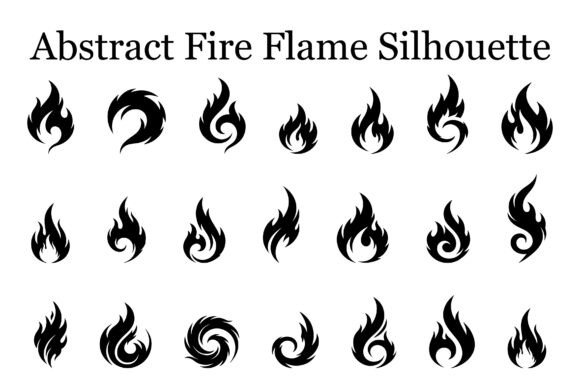
When you work with visual assets day in and day out, you quickly learn that not all design resources are created equal. Some are decorative — nice to look at but difficult to implement. Others are built for real work. The Abstract Fire Flame Silhouette bundle falls squarely into the latter category. This collection of 20 flame vector designs offers a practical starting point for anyone who needs bold, high-energy visual elements that integrate cleanly into existing production pipelines. Whether you are producing vinyl decals, apparel graphics, sports branding, or packaging for a craft food product, these silhouettes are designed to save you time and reduce friction during layout, cutting, and output.
Understanding how to use these assets effectively means thinking about where they fit in your broader process — before you start a project, during the design phase, and after you deliver the final file. Let’s walk through each stage.
Understanding the Asset and Its Role in the Design Process
At its core, the Abstract Fire Flame Silhouette bundle is a set of scalable vector and raster files that depict flame forms ranging from sleek modern curves to more aggressive, tribal-inspired shapes. Because these are silhouettes, they work as standalone graphic elements or as building blocks within a larger composition. They are not overly complex illustrations with gradients and shading; they are clean, high-contrast shapes that cut well, print crisply, and layer easily over other artwork or backgrounds.
This simplicity is a feature, not a limitation. In production workflows, the ability to take a silhouette, scale it without loss, and combine it with text or other graphics is critical. The bundle includes SVG, EPS, PNG, and JPG formats — each aimed at a specific part of the production chain. SVGs and EPSs handle the vector side for cutting machines and illustration software. PNGs with transparent backgrounds cover quick previews, mock-ups, and digital overlays. JPGs provide a flattened reference for clients or team members who do not need editable files.
The collection works well for anyone who regularly produces physical goods — stickers, apparel, signs, laser-engraved items — or digital assets like social media graphics, game interfaces, and logo concepts. It fits naturally into a workflow that begins with an idea and ends with a manufactured or printed product.
Before the Project: Preparation and Planning
Integrating the Abstract Fire Flame Silhouette bundle into your workflow starts before you open any software. The first step is to review the full set of 20 designs and understand the range of styles. Some flames are tall and tapered, suited for vertical layouts. Others are wider and more explosive, working well as central focal points or repeating patterns. Knowing what is in the collection allows you to plan your composition without hunting for the right shape mid-project.
If you are preparing a file for a Cricut or Silhouette machine, the SVG format is your primary resource. Before importing, confirm that your software version supports SVG import — most modern versions of Cricut Design Space, Silhouette Studio, and Brother ScanNCut do. If you work in Adobe Illustrator, CorelDRAW, or Inkscape, the EPS files give you the most control over anchor points, stroke weight, and color fill. For quick test prints or client previews, the PNG set at 300 DPI is sufficient for on-screen review and standard laser printing.
A practical planning step is to create a folder structure that separates these files by format and by style group. Even a simple naming convention — for example, flame_01_sweep.svg, flame_02_tribal.svg — pays off when you are juggling multiple projects. If you share a cloud drive with team members or clients, including a reference JPG sheet showing all 20 silhouettes helps everyone stay aligned on which element is being used where.
During Design: Integration with Tools and Methods
Once you begin laying out your project, the Abstract Fire Flame Silhouette bundle interacts with your design tools in predictable and useful ways. If you are working on a t-shirt graphic, for example, you can import an SVG or EPS flame into Illustrator, convert it to a compound path, and merge it with text or a secondary shape. Because the flame is a silhouette, it requires minimal cleanup — no stray points, no hidden elements. This saves time when you are iterating through multiple color variants or sizing options.
For vinyl decal production, the key consideration is weeding. The flame designs in this bundle tend to have open, flowing curves and relatively few tight interior cuts. That makes them a good choice for both hobbyist cutters and commercial plotters. If you plan to produce multilayer decals — a flame in red with a black outline, for instance — duplicate the vector layer in your software, offset the stroke, and assign a knockout color. The silhouette format handles this easily because there are no gradients or transparency artifacts to manage.
Another common workflow involves laser engraving or wood burning. For these methods, you need a clean black-and-white image that defines exactly where the laser or burner should mark the surface. The PNG files at 300 DPI work well for raster engraving, but for vector-based engraving (where the laser follows a path), the SVG or EPS is superior. You can reduce the file to a single black fill, remove any extraneous layers, and set the laser power based on the thickness of the flame outlines. The abstract nature of these flames — curving, tapering, intersecting — gives you visual variety without requiring you to trace a photograph or hand-draw a shape.
If you are working on sports logos or gaming graphics, the aggressive tribal-style flames in the bundle serve as accents alongside bold typography. A common layout method is to place a flame silhouette behind the main logotype, scaled to about 150 percent of the text height, with a color that contrasts the background. Because the flames are abstract rather than literal, they convey energy without competing with the readability of the wordmark.
After Delivery: Output, Quality Control, and Repurposing
Once you have finalized your design, the next stage is production. The Abstract Fire Flame Silhouette bundle supports multiple output channels from a single source file. If you export your final layout as an SVG, you can send it directly to a cutting machine. If you output a high-resolution PNG, it is ready for DTG (direct-to-garment) printing or sublimation. The key to efficient output is to maintain a master file in your primary vector application, then generate the specific format needed for each production method.
Quality control after cutting or printing is straightforward with these silhouettes. Because the shapes are solid with clear boundaries, any mis-cut or registration error becomes immediately visible. Check the edges of the flame on a test cut — there should be no jaggedness if your blade is sharp and your software settings match the material. For printed items, ensure the flame color is consistent across the full shape, especially if you are printing on a textured surface like canvas or corduroy.
Long-term value comes from repurposing. The same flame silhouette you used for a hot sauce label can be scaled down for a social media avatar or enlarged for a vinyl wall graphic. Because the bundle includes 20 distinct designs, you can create a cohesive brand system — use one flame as the primary logo mark, another as a background texture, and a third as a repeating border element. Over several projects, the initial investment in this bundle pays for itself in time saved on original illustration and vector cleanup.
Practical Implementation Tips for Common Use Cases
- Vinyl decals and motorcycle stickers: Use the SVG files directly in Cricut Design Space or Silhouette Studio. Scale the flame to fit your surface. For outdoor durability, pair the design with a laminate layer. The open curves allow for easy weeding on intermediate and advanced vinyl.
- Apparel design: Test the flame size on a mock-up before cutting. A flame that looks balanced on screen may feel too large or too small on a shirt. Print a paper template at full scale and hold it against the garment. The EPS format lets you adjust proportions without losing quality.
- Hot sauce labels and BBQ branding: Combine a flame silhouette with a bold serif or sans-serif typeface. Use the PNG with a transparent background to overlay the flame behind the product name in Photoshop or Canva. Keep the flame color aligned with your brand palette — reds, oranges, and blacks work well for spicy or smoky products.
- Sports team logos and gaming graphics: Layer two flame silhouettes at different scales and rotate them slightly for a dynamic, multi-dimensional effect. Use the EPS files in Illustrator to adjust anchor points if you need a custom twist on a specific shape.
- Laser engraving and wood burning: Import the SVG into your laser software. Set the line type to cut or engrave based on the depth you want. A single pass at moderate power works best for silhouettes with moderate detail; test on scrap wood first to avoid burn-through on thin material.
Maintaining Consistency and Efficiency Over Time
One of the underappreciated aspects of using a curated asset bundle like this is the consistency it brings to your work. When you use the same set of flame silhouettes across multiple projects, your designs develop a visual coherence that is hard to achieve with one-off illustrations. Clients and customers start to recognize the style. For a small business owner or freelancer, that brand recognition is valuable.
To keep your workflow efficient over multiple uses, build a library file inside your primary design application. Import all 20 SVG or EPS flames into a single Illustrator or CorelDRAW document, arranged on a grid. Label each one by its style category — modern, tribal, sweep, burst — so you can copy and paste the right shape in seconds. This simple organizational step turns the bundle from a collection of files into a tool you can reach for without breaking your creative flow.
Finally, remember that these silhouettes are starting points. You can mirror them, overlap them, or combine them with other abstract shapes to create entirely new forms. The people who get the most value from this bundle are those who treat it as a flexible resource rather than a fixed set of templates. Plan your layout, integrate the flames into your preferred software, check your output quality, and keep your library organized — that is the workflow that turns a good asset into a reliable part of your process.