Engraved Dragon Serpent SVG: What to Check Before You Buy or Use This Vintage Etching Set
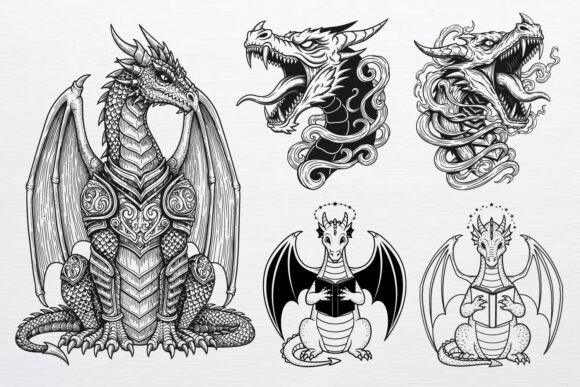
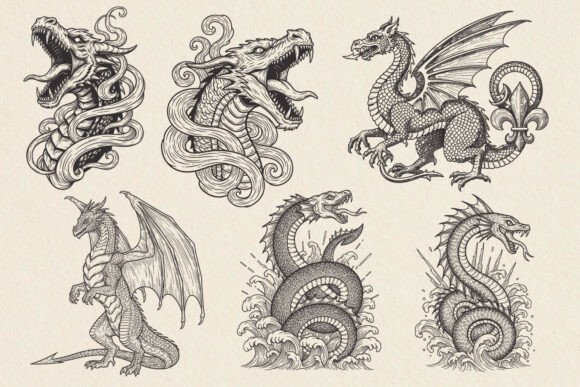
Engraved Dragon Serpent SVG refers to a digital design set that recreates the look of old-world engravings and etching illustrations, centered on dragons, serpents, and sea monsters. If you have come across these files, you likely noticed the dramatic, black-line style that mimics copperplate or woodcut art. The set typically includes smoke-wrapped roaring dragon heads, heraldic standing dragons, and detailed sea serpents rising from splashing waves. The appeal is obvious for anyone working on dark fantasy T-shirts, tattoo flash, gaming artwork, book covers, posters, stickers, or Cricut and Silhouette cutting projects. But before you download or purchase an Engraved Dragon Serpent SVG set, there are several practical considerations that can save you time, frustration, and poor results. This article walks through the most common mistakes people make with files like these and how to avoid them.
Not Checking File Format Compatibility Before You Buy
One of the most overlooked steps is verifying that your software or machine actually supports the file formats included. A typical Engraved Dragon Serpent SVG set comes with EPS, SVG, DXF, and PNG files. Each format serves a different purpose. SVG works well for web and vector editing programs like Adobe Illustrator, Inkscape, or Affinity Designer. DXF is commonly used for laser cutting and CAD software. EPS is a fallback for older vector workflows. PNG provides a ready-to-use raster image with transparency.
Beginners sometimes assume all these formats work everywhere. They do not. For example, if you use a Cricut and attempt to load an EPS file directly, the software may reject it or display errors. The SVG file is almost always the safer bet for cutting machines. For laser engraving, DXF tends to be the standard. If you intend to print on demand or create digital art, the PNG file saves you the step of rasterizing a vector yourself.
What to do instead: Check the product description carefully to confirm that at least one file type matches your workflow. If you are new to vector design, look for sets that explicitly state compatibility with your software or machine. A set that offers all four formats is ideal, but only if you know which one you actually need.
Overlooking the Difference Between Engraved-Style Vectors and True Engraving Files
An Engraved Dragon Serpent SVG is designed to look like an engraving. It uses fine lines, crosshatching, and high contrast to mimic the etching process. However, this is not the same as a file optimized for actual laser engraving. If you plan to use a laser cutter or engraver, you need to look at the line thickness, the density of the details, and whether the design is set up for scoring versus cutting.
A common mistake is importing a highly detailed vector file into laser software and discovering that the thin lines burn away or become invisible on certain materials. The heraldic standing dragon with intricate scale patterns may look stunning on screen, but when engraved into wood or acrylic, the fine details can merge together.
Better approach: Before committing to a design, check whether the seller provides a preview of the file tested on a physical medium. If not, request a sample or test a small section on scrap material. For laser users, consider whether the design has clear separation between solid black areas and fine linework. Dark fantasy T-shirt designs, on the other hand, benefit from high-contrast line art that stands out when printed, so the same file may work better for screen printing than for laser engraving.
Ignoring Commercial Use Terms for Print on Demand and Physical Products
The Engraved Dragon Serpent SVG set allows commercial use for physical products. That is a clear benefit. But many buyers misunderstand what that actually covers. Commercial use for physical products typically means you can print the design onto T-shirts, mugs, tote bags, pillows, stickers, cards, posters, and wall art and sell those items. It does not necessarily mean you can resell the digital files themselves, include them in a bundle, or use them in digital products without restrictions.
Entrepreneurs and small business owners sometimes assume that because the product description says "commercial use," they can do whatever they want. This is a mistake that can lead to copyright infringement or a revoked license. The phrase "commercial use allowed for physical products" is specific. It usually excludes digital redistribution.
What to check: Read the license agreement included with the download. If it is not visible before purchase, contact the seller. If you plan to use the designs for print-on-demand services like Printful or Merch by Amazon, confirm that those platforms are explicitly allowed. Some licenses restrict POD use or require a separate extended license. Knowing this before you start designing saves you from having to remove products later.
Underestimating How Line Art Behaves at Different Sizes
Engraved-style dragons and sea serpents rely on dense linework to create depth and texture. A roaring dragon head wrapped in smoke looks dramatic when printed large, but at small sizes, the lines can become muddled. This is a frequent problem for sticker makers and small product designers. If you shrink a detailed sea serpent too much, the waves and scales lose definition and the design becomes a dark blob.
Similarly, if you expand a design beyond its intended resolution, you may notice jagged edges or loss of sharpness if you are working from the PNG file. The vector SVG avoids this issue at any scale, but only if the original file is well constructed. Some poorly made vectors have overlapping paths, stray points, or inconsistent stroke widths that cause problems when resized.
Practical advice: Always test the design at your intended output size early in the process. For T-shirts, scale the design to fit the print area and check that the fine details remain legible. For stickers, consider whether the design works at 2 inches or 4 inches. If the detail is too fine, you may need to simplify it or choose a different design from the set. A heraldic standing dragon with bold outlines often scales better than a highly detailed sea serpent with many thin lines.
Choosing the Wrong Design for the Application
An Engraved Dragon Serpent SVG set typically contains multiple distinct designs: roaring dragon heads with smoke, heraldic standing dragons, and sea serpents rising from waves. Each has a different feel and level of complexity. Beginners often pick the most dramatic design without considering how it will look in their specific use case.
For example, tattoo flash requires designs that flow with the body and work well as standalone art. A roaring dragon head wrapped in smoke can be excellent for a shoulder or chest piece, but the same design may look awkward on a forearm if the smoke wraps too tightly. For book covers, a heraldic standing dragon often communicates nobility and fantasy better than a sea serpent, which may evoke maritime horror instead. For Cricut or Silhouette cutting projects, designs with large solid areas are easier to weed than designs with many thin, separate lines.
Better selection strategy: Look at the preview images and ask yourself what emotion or theme you want to convey. Match the complexity of the design to the size and purpose of your product. If you are making stickers, consider how much cutting is required around intricate edges. If you are designing a poster, the sea serpent with splashing waves might make a powerful centerpiece, but it needs enough surrounding space to breathe.
Neglecting to Prepare the Vector for Cutting Machines
Cricut and Silhouette users sometimes import an Engraved Dragon Serpent SVG file and immediately try to cut it without checking whether the design is ready. The SVG may contain multiple layers, grouped objects, or paths that are not fully closed. This leads to incomplete cuts, extra weeding work, or wasted material.
Common issues include compound paths that the cutting software does not recognize, strokes that have not been converted to outlines, or overlapping elements that create unexpected cut lines. A detailed sea serpent with splashing waves may have dozens of small islands of white space that need to be removed manually.
What helps: Open the SVG in a vector editor before loading it into your cutting software. Look for stray points, open paths, and overlapping shapes. Use the weld or unite function to merge overlapping areas into a single shape. For designs with fine details, consider increasing the line thickness slightly to make weeding easier. Double-check that the design is set to cut lines rather than score lines unless you want partial cuts.
Missing the Opportunity to Style the Design for Your Brand
The Engraved Dragon Serpent SVG set is a starting point, not a finished product. Many users make the mistake of using the design exactly as downloaded, without adding their own styling. This can make products look generic or obviously sourced from the same asset packs as everyone else's. Dark fantasy and gothic aesthetics thrive on personalization, so a generic design may not stand out.
Vintage etching style invites customization. You can invert the colors for a white-on-black effect, layer the design over textured backgrounds, or combine multiple elements from the set to create a composition that feels unique. For T-shirt designs, consider adding distressed textures, halftone patterns, or subtle color accents. For book covers, the heraldic standing dragon can be framed with typography that matches the era of the design.
Better approach: Treat the SVG files as raw material. Experiment with different placements, rotations, and layering. Use the PNG file as a texture layer or mask. If you have vector editing skills, modify the line weights or add your own smoke, flames, or heraldic elements to make the design your own. The commercial license allows you to create physical products, but the value comes from how you adapt the art.
Failing to Verify the Resolution of the PNG File
While the vector files are resolution-independent, the PNG file included in an Engraved Dragon Serpent SVG set is a raster image. Its resolution matters for printing. Some sets provide a PNG at 300 DPI, which is suitable for most print applications. Others may provide a lower resolution PNG meant only for previewing. If you plan to use the PNG for digital products or print-on-demand without opening the vector, check the pixel dimensions and DPI upfront.
Simple check: Right-click the PNG file after downloading and check its properties. For a design that will be printed at 8 inches by 10 inches, you want at least 2400 by 3000 pixels at 300 DPI. Anything less and the print may appear soft or pixelated. If the PNG is too small, you can export a higher resolution version from the SVG file using vector software.
Looking Beyond the Obvious: What Makes This Set Valuable
The Engraved Dragon Serpent SVG set is more than just a collection of dragon art. Its vintage etching style carries a specific mood that is hard to replicate with modern digital brushes. The smoke-wrapped roaring heads, the heraldic stance of the standing dragon, and the dynamic sea serpents all reference historical illustration techniques. For tattoo artists, this translates into flash that feels timeless. For game artists, it provides assets that fit dark fantasy or steampunk aesthetics without looking cartoonish. For small business owners, it offers a cost-effective way to produce merchandise with a premium look.
The key is to approach the files with realistic expectations. They are not plug-and-play for every situation. They require some preparation, some testing, and some creative judgment. But when you match the right design to the right application and prepare the file properly, the results can be striking. Whether you are making T-shirts for a convention, designing a poster for a fantasy novel, or creating stickers for a brand, the engraving style adds a level of detail and seriousness that flat vector art often lacks.
Before you start your project, take a few minutes to review the formats, check the license, test the scale, and prepare the vector for your machine. Those small steps separate a product that looks professional from one that looks like a quick print. The Engraved Dragon Serpent SVG set gives you a solid foundation. The rest is up to how you use it.