Futuristic Gaming Mouse Pad Sublimation Design Guide
Custom sublimation printing has opened up new possibilities for creators, small business owners, and anyone who wants to transform everyday objects into personalized pieces. Among the most sought-after designs is the futuristic gaming mouse pad sublimation template—a high-resolution PNG file that gives you the freedom to print on far more than just mouse pads. Whether you are looking to expand your product line, create a one-of-a-kind gift, or simply experiment with a new creative medium, understanding what this file offers and how to use it well can make a real difference in your results.
This article walks through what makes this particular design file valuable, who benefits most from using it, and what practical considerations you should keep in mind before you start printing. The goal is to help you make informed decisions and get the most out of your sublimation projects.
What Makes a Futuristic Gaming Mouse Pad Design Stand Out
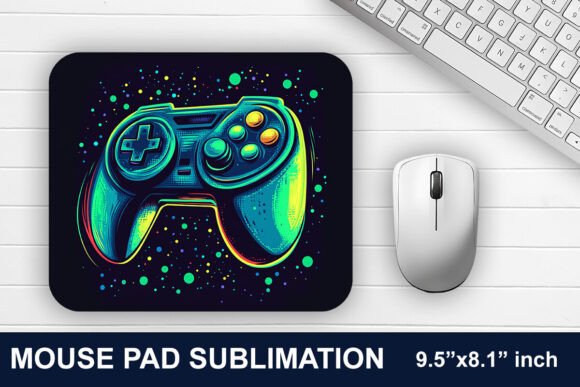
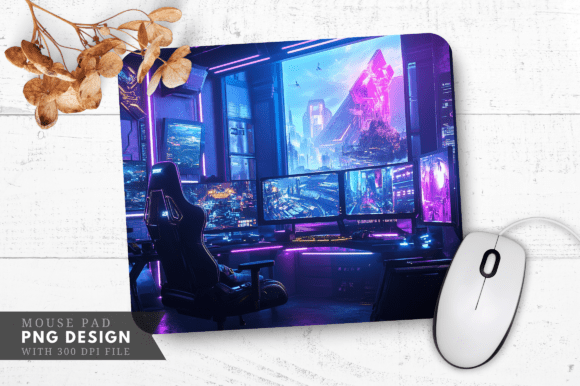
A well-designed gaming mouse pad does more than protect a desk surface. It contributes to the overall look and feel of a gaming setup, which for many enthusiasts is a point of pride. A futuristic aesthetic—with sleek lines, neon accents, cyberpunk-inspired geometry, or sci-fi motifs—appeals to gamers, streamers, and tech professionals who want their workspace to reflect their personal style. The sublimation file you receive is specifically crafted with this audience in mind. It is not just a generic pattern; it is a theme that speaks to a community that values immersion, speed, and visual impact.
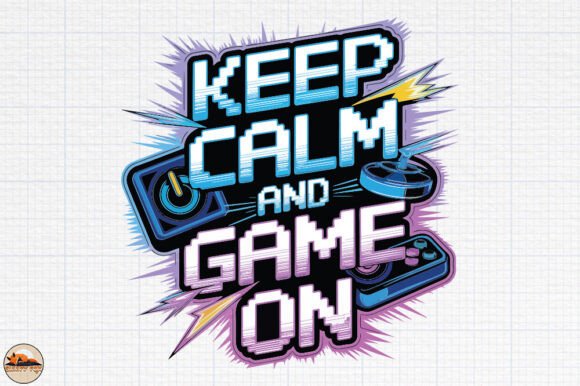
Because the file is a single PNG with a transparent background and 300 DPI resolution, it retains sharp details and clean edges. This means the design prints crisply on a variety of surfaces, from cloth mouse pads to rigid substrates like cutting boards or phone cases. The transparent background also makes it easy to layer the design over colored blanks or to composite it with other elements in your editing software, giving you full control over the final look.
Who Benefits Most from This Sublimation File
This design file is not limited to one type of user. Its versatility means several groups can put it to good use:
- Small business owners and print-on-demand sellers can add a fresh, on-trend design to their catalog without investing in custom artwork from scratch. The file is ready to use, and because it works on multiple product types, you can test different items with minimal risk.
- Hobbyists and DIY creators who enjoy making personalized gifts or home decor will find the file easy to work with. Whether you are making a mouse pad for a friend or a set of coasters for yourself, the high resolution ensures professional-looking results.
- Streamers and gaming enthusiasts who want a unique setup can print the design on a large mouse pad, a desk mat, or even a pillow to create a cohesive themed environment. Because you control the printing, you can also adjust colors to match your existing gear.
- Educators and workshop leaders teaching sublimation techniques can use this file as a demonstration project. Its clear lines and transparent background make it a good example for showing students how to handle PNG files, adjust sizing, and test different substrates.
Practical Applications Beyond the Mouse Pad
The product description lists a range of items the design works on, and that list is not just marketing language. Sublimation printing allows the ink to bond with polymer-coated surfaces, which means the same PNG file can be used on mouse pads, pillows, cutting boards, phone cases, bags, mugs, stickers, tumblers, signs, and many other blanks. Each of these applications benefits from the 300 DPI resolution, which prevents pixelation even when the design is printed at larger sizes.
For example, a mug printed with this futuristic design becomes a conversation piece in an office or gaming room. A pillow with the same pattern adds to the atmosphere of a gaming chair or couch. A cutting board might seem like an unusual choice, but for the right customer—perhaps someone who enjoys sci-fi themed dinner parties or wants a unique gift—it stands out from typical kitchen items. The design file gives you the flexibility to explore these possibilities without needing separate artwork for each product.
Technical Quality and What It Means for Your Prints
The file you receive is a single PNG at 300 DPI with a transparent background. These specifications matter for several reasons:
- 300 DPI is the standard resolution for high-quality print output. It ensures that fine details and gradients in the futuristic design remain sharp rather than becoming blurry or jagged. When you print on a large mouse pad, the difference between 150 DPI and 300 DPI is clearly visible in the edges and text if any is present.
- Transparent background means you can place the design on any colored blank without a white box around it. This is especially useful for sublimating onto dark or vibrant substrates where a white border would look unprofessional. It also allows you to overlay the design on other backgrounds in your editing software for further customization.
- PNG format is widely supported by design programs such as Photoshop, GIMP, Affinity Photo, Canva (Pro), and many others. You do not need specialized software to open and edit the file, though you will need a program that can handle PNG layers if you want to do any resizing or color adjustments before printing.
What to Keep in Mind Before You Print
While the file is designed for ease of use, a few practical considerations can help you avoid common pitfalls and achieve consistent results.
Monitor Calibration and Color Variation
The product note mentions that different computer monitors display colors differently. This is a real factor in sublimation work. What looks like a bright neon blue on your screen may appear slightly muted or shifted on another monitor or after printing. If color accuracy is critical for your project—for example, if you are matching the design to existing branded merchandise—it is wise to print a small test first. Many sublimation printers allow you to do a small-scale test on a sample blank or even on sublimation paper alone to see how the colors render on your specific substrate.
File Preparation and Software Requirements
You will need a computer to unzip the zip file and a design editing program that supports PNG file formats. Free options like GIMP or online tools like Photopea can handle resizing and flipping if needed. If you plan to mirror the image (which is often required for sublimation), make sure your software has a horizontal flip function. The transparent background can sometimes cause issues if your editing program does not handle transparency well, so verify that your exported file retains the transparent areas before sending it to print.
Substrate Compatibility
Not all blanks sublimate equally. Mouse pads designed for sublimation usually have a polyester coating that accepts the ink readily. Pillows, bags, and phone cases vary widely in their coating quality. If you are new to sublimation on a particular item, test a small area or use a known supplier that guarantees compatibility. The design file itself is high quality, but the final result depends just as much on the blank and the press settings as it does on the artwork.
How to Get the Most Value from This File
One file can serve many purposes, and a little planning helps you maximize its potential. Consider creating a small collection of products with the same futuristic theme: a mouse pad, a mug, and a phone case, for instance. This gives customers or gift recipients a coordinated set that feels intentional rather than random. If you sell online, offering a bundle of items with matching designs can increase order value and reduce decision fatigue for buyers.
Another approach is to use the design as a base and customize it further. Because the PNG has a transparent background, you can add text, logos, or additional graphic elements on top. A gaming team might add their tagline. A small business could overlay a brand name. The futuristic style works well with neon-colored text or metallic foils if your sublimation setup supports those effects.
Who Should Consider Alternatives
While this file is versatile, it is not the perfect fit for every situation. If your project requires extremely precise color matching across multiple print runs—like for corporate merchandise with strict brand guidelines—you may want to work with a custom color profile and possibly a vector-based file instead of a PNG. Similarly, if you need to print at very large sizes, such as a full desk cover larger than 36 inches, verify that the 300 DPI PNG scales cleanly to your target dimensions. For most standard mouse pads and home goods, the file size is more than adequate, but checking early saves time and materials.
Also, if your audience prefers minimalist or organic patterns rather than sci-fi or cyberpunk themes, this design may not resonate as strongly. The futuristic look has a specific visual language that appeals to a certain demographic. Understanding your customers or recipients helps you decide whether this style aligns with their tastes.
Final Thoughts on Working with Sublimation PNG Files
The futuristic gaming mouse pad sublimation file represents a practical tool for anyone involved in custom printing. Its high resolution, transparent background, and broad compatibility make it suitable for a wide range of products, from the expected mouse pad to more surprising items like cutting boards and pillows. The key to getting great results lies in understanding the technical requirements of your equipment and blanks, testing colors before committing to a full run, and thinking creatively about how a single design can serve multiple purposes.
Whether you are a seasoned print shop owner or someone trying sublimation for the first time, this file gives you a solid starting point. Take the time to experiment with different substrates, adjust your press settings, and explore how the design interacts with various blank colors. With careful preparation and a clear idea of who you are creating for, you can turn this single PNG into a reliable addition to your product lineup or your personal workspace aesthetic.