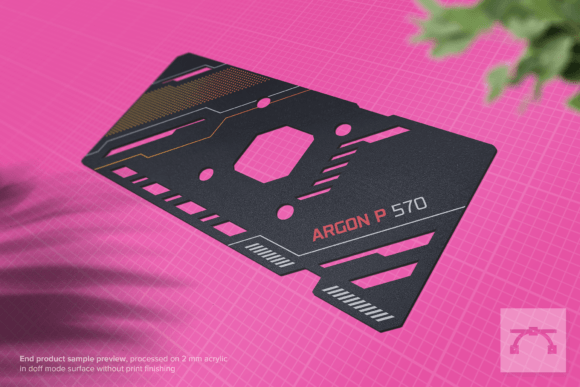
Redefining GPU Aesthetics and Maintenance with the Argon P 570 – GPU Backplate Template
Graphics cards have long been the centerpiece of high-performance builds, but their visual identity often remains locked behind mass-produced shrouds and generic backplates. Enthusiasts, modders, and even professionals performing routine thermal maintenance know that the stock appearance does not always reflect the care put into the rest of the system. The Argon P 570 – GPU Backplate Template enters this space as a precision-focused solution that merges functional utility with custom aesthetics. Rather than offering a finished product that dictates your build’s look, this template hands control to the user—whether your goal is a subtle monochrome panel, a vibrant UV-printed design, or a laser-etched pattern that echoes the rest of your rig.
At the heart of the template’s appeal is its laser-cut accuracy and a design refined over four years of development. This is not a quick extrusion or a generic punched plate; it is a vector-based blueprint intended to be processed with laser cutting machines and UV flatbed printers. The result is an end product that fits the exact footprint of supported graphics cards, eliminating the guesswork that often plagues DIY backplate projects. The Argon P 570 – GPU Backplate Template bridges the gap between off-the-shelf hardware and fully bespoke modding, making it equally relevant for first-time builders and seasoned system integrators.
Beyond Visual Appeal: The Practical Utility of Precision Screw Holes
One of the most overlooked aspects of GPU maintenance is the process of repasting or replacing thermal pads. Every time you disassemble a graphics card to refresh the thermal interface material, the original backplate must be removed and reinstalled. Stock backplates often rely on awkward spring-loaded screws or fragile standoffs that make alignment tedious, especially when working inside a cramped case. The Argon P 570 – GPU Backplate Template addresses this directly with four strategically placed screw holes that correspond to the PCB mounting points of compatible cards.
These screw holes are not an afterthought. They are positioned to align perfectly with the mounting pattern of the PHANTOM-GDR-RX570-4G and PHANTOM-GDR-RX570-4G extended variants, as well as the ASRock Phantom Gaming D RX 570 4GB and the OC 8GB PG-D-RADEON-RX570-8G-OC extended models. Because the template is a true vector file rather than a fixed physical product, you can cut or mill the holes to your exact tolerance. This means that when you remove the backplate to clean the heatsink or apply fresh thermal paste, reattachment is straightforward: line up the four points, secure the screws, and you are done. No hunting for alignment tabs, no cross-threading, no accidental damage to the PCB.
From a maintenance workflow perspective, this simplifies an otherwise fiddly process. Many users report that regular repasting extends the lifespan of a GPU and keeps thermals under control, but they are deterred by the hassle of dealing with ill-fitting backplates. The Argon P 570 template removes that friction. Whether you are repasting every six months or doing a one-time upgrade, the precision of the screw hole placement translates directly into a more confident and efficient experience.
Four Years of Iteration: What That Means for Fit and Finish
The mention of a four-year development cycle might sound like marketing language, but in the context of backplate templates, it reflects real engineering effort. GPU PCBs from the same family often have subtle revisions: a capacitor moved, a bracket repositioned, or a mounting hole shifted by half a millimeter. The Argon P 570 – GPU Backplate Template accounts for these variations by offering a design that has been tested against multiple physical samples of the ASRock Phantom Gaming D RX 570 series. This iterative testing means that the screw holes, cutouts, and overall profile match the extended PCB versions without requiring manual trimming.
This is especially relevant because backplates that are off by even 1 mm can short components, block airflow, or simply refuse to mount. By providing a vector file format (AI, SVG, EPS, PDF), the template allows you to adjust the design for your specific material thickness or laser kerf. The vector graphics are 100% scalable, ensuring that your final cut remains faithful to the intended dimensions even if you scale the file up or down slightly for a different material.
The artwork itself is compatible with Adobe Illustrator CS4 or higher on Windows, making it accessible to a wide range of users—from hobbyists running older software to professional studios using the latest Creative Cloud suite. Adobe fonts are used in the included pre-made designs, so if you want to modify the typography, the font links are provided in the user guide. This attention to compatibility underscores the template’s role as a professional-grade tool, not a quick consumer print.
Two Pre-Made Artworks: A Starting Point for Customization
Coming up with a visual concept from scratch can be intimidating, especially if you are new to laser cutting or UV printing. The Argon P 570 – GPU Backplate Template includes two pre-made artworks that are ready to process. These designs serve as a starting point that you can use as-is, modify, or completely ignore in favor of your own vector graphics. Each artwork is layered properly—cut lines in one layer, engrave or print areas in another—so that your laser cutting machine and UV printer can work together without confusion.
Having these pre-made files is particularly useful for users who want a clean, professional look without spending hours in Illustrator. You can send the files straight to your fabrication partner or local makerspace and receive a finished backplate with no design work required on your part. Alternatively, if you are a creator or educator teaching a class on GPU modding, these pre-made artworks provide a clear example of how vector templates are structured for production.
Material Considerations: Acrylic, Aluminium, and Thermal Management
Choosing the right material is a critical step that affects both aesthetics and thermal performance. The recommended materials for the Argon P 570 – GPU Backplate Template are 2 mm acrylic or aluminium sheet. Each has its own set of trade-offs.
Acrylic offers a clean, transparent or translucent finish that can be edge-lit with LEDs for a striking visual effect. It is easy to laser cut and does not require expensive tooling. However, acrylic is a thermal insulator, so it will not actively help dissipate heat from the back of the PCB. For many builds, this is acceptable because the back of the GPU does not house the core die, but it is worth considering if your card runs particularly hot or if you rely on backplate cooling.
Aluminium, on the other hand, conducts heat moderately and can provide a small amount of passive cooling. It gives a premium, industrial look that matches aluminium cases and radiators. Cutting aluminium requires a more powerful laser or a CNC router, but the result is more durable and feels higher quality in the hand. The vector template works equally well for both materials, and the screw holes are positioned to accommodate the thickness of 2 mm material without interfering with component clearance.
Whichever material you choose, the application method is consistent: use double-sided tape or thermal pads to adhere the finished backplate to the PCB. The template file includes clear markings for where tape should be applied to avoid blocking airflow or touching hot components. If you use thermal pads, you can even achieve some heat transfer from memory modules or VRM components on the back side of the board, turning the backplate into a passive heatsink.
Who Benefits from This Template in Practice
A broad range of users will find value in the Argon P 570 – GPU Backplate Template, and the use cases extend well beyond pure aesthetics.
Professional system integrators and PC repair shops can use the template to create branded backplates for client builds. A custom backplate with a company logo and clean lines adds perceived value to a finished system, and the ability to laser cut in small batches means no inventory overhead. The precise screw hole alignment also means that the integrator can perform warranty or maintenance work without fighting with misaligned panels.
Hobbyist modders and enthusiasts gain the freedom to express their personal style. Whether you are building a themed rig around a color palette or a specific franchise, the vector file lets you incorporate any artwork you can create or license. The two included designs are a fallback, but the real power is in the open canvas. Modders who document their builds on forums or social media will appreciate having a backplate that matches the front shroud and custom cabling.
Educators and workshop facilitators teaching digital fabrication or product design can use this template as a real-world project example. Students learn about tolerance, material selection, and the difference between vector cut lines and raster engraving. The template’s compatibility with Adobe Illustrator makes it easy to integrate into existing curricula, and the straightforward mounting method means students can produce a finished physical product in a single session.
Researchers and hardware tinkerers who frequently swap thermal compounds or test different cooling configurations will appreciate the reduction in downtime. Instead of wrestling with the original backplate each time they access the die, they can rely on the template’s precise mounting points for quick reassembly. This is particularly relevant for those running long-term endurance tests or overclocking experiments where thermal cycling is frequent.
Business owners offering custom PC building as a service can differentiate their offerings by including a bespoke backplate as a standard feature. The template eliminates the need to outsource design work for every order. With the included vector formats, you can maintain a library of in-house designs that can be cut on demand, reducing lead time and increasing profit margins on custom builds.
Workflow from File to Finished Backplate
Understanding the typical workflow helps demystify the process for anyone who has not used laser cutting templates before. After downloading the Argon P 570 – GPU Backplate Template, the files are organized by format. You will find AI, SVG, EPS, and PDF versions, all containing the same vector geometry. Open the file in Adobe Illustrator (CS4 or later) or a compatible vector editor. The cut lines are drawn as strokes with specific colors: typically a hairline red for laser cuts and a black fill for engraving or UV print areas.
If you want to use one of the two pre-made artworks, you can proceed directly to fabrication. If you are creating your own design, import your artwork into a new layer and ensure that it does not overlap the mounting holes or structural cut lines. The template includes clear labeling of each hole and slot, so you can confidently redesign the visual area without breaking the functional geometry.
Once your design is final, send the file to a laser cutting service or use your own machine. For acrylic, a CO2 laser at moderate power produces clean edges. For aluminium, a fiber laser or CNC router is recommended. After cutting, clean any residue from the edges. If you are combining laser cutting with UV printing, print the design on the flat sheet before cutting, or use a flatbed printer after cutting depending on your equipment.
Apply double-sided tape or thermal pads to the back of the finished plate, aligning with the indicated areas. Carefully position the backplate over the GPU PCB, ensuring the four screw holes line up with the mounting points. Insert and tighten the screws gently—over-tightening can crack acrylic or strip threads in aluminium. That is it. The GPU is now equipped with a custom backplate that fits securely and looks exactly as you intended.
Observations on Durability and Long-Term Use
Practical field experience with backplates made from this template shows that both acrylic and aluminium hold up well under normal operating conditions. Acrylic can develop micro-scratches over time if frequently handled, but since the backplate is inside the case and rarely touched, this is seldom an issue. Aluminium is more resistant to surface wear and can be anodized or painted for added durability.
The double-sided tape method, while simple, is surprisingly robust. High-quality 3M VHB tape or similar acrylic foam tapes provide strong adhesion even in warm GPU environments. Thermal pads add a slight thickness that must be accounted for in the design—the template already factors a standard pad thickness into the clearance, so using 1 mm to 1.5 mm pads works well. Users who have installed backplates using this method report no shifting or rattling even in vertically mounted GPUs or systems subjected to transportation.
One consideration to keep in mind is that the template does not include a cutout for the GPU’s IO bracket or rear display ports, as those areas are not covered by the backplate. This is by design: the backplate covers only the PCB area, leaving the bracket and ports unobstructed. Ensure that your chosen artwork does not extend into areas that would interfere with cables or brackets.
Real-World Relevance Beyond the RX 570
While the Argon P 570 – GPU Backplate Template is specifically dimensioned for the ASRock Phantom Gaming D RX 570 series and its extended PCB variants, the underlying concept applies broadly to any GPU modding project. The template serves as a blueprint for understanding how to measure, align, and produce custom backplates for other cards. Users who master the workflow on the RX 570 can apply the same techniques to create templates for other GPUs by taking their own measurements and replicating the vector structure.
This is part of a larger trend in PC hardware where users are moving away from purely off-the-shelf components and toward semi-custom or fully custom solutions. The availability of precise vector templates empowers a generation of builders who want their systems to reflect their individuality without compromising on fit, function, or maintainability. The Argon P 570 template is a concrete example of how a single product can serve as both a practical tool and a gateway into the broader world of digital fabrication and PC personalization.
For anyone working with the ASRock Phantom Gaming D RX 570—whether 4GB or 8GB, standard or extended—the Argon P 570 offers a reliable, repeatable path to a custom backplate that simplifies maintenance and elevates the visual impact of the build. The four years of design iteration, the vector precision, and the inclusion of ready-to-use artworks make it a tool that is equally suited to the workshop, the classroom, and the enthusiast’s workbench.