Vanadium K 2070 Extra – Laser Cut: A New Canvas for GPU Customization
If you have ever looked inside your PC case and wished the hardware reflected more of your personality, you are not alone. The graphics card, often the visual centerpiece of a build, is also one of the most uniform components on the market. Most backplates are plain black metal or plastic — functional, but far from inspiring. The Vanadium K 2070 Extra – Laser Cut template set changes that entirely. It does not just offer a replacement backplate; it hands you the creative tools to design one from scratch, with precision and professional-grade file formats ready for production. Whether you are a seasoned modder or a first-time builder looking to add a personal touch, this product opens a door to a level of control that standard aftermarket parts simply cannot match.
What Is the Vanadium K 2070 Extra – Laser Cut?
At its core, the Vanadium K 2070 Extra – Laser Cut is a digital design template package tailored for specific EVGA RTX 2070 Super models. It provides the exact dimensions — 26.52 x 9.92 cm — and mounting layout needed to create a custom backplate for graphics cards such as the 08G-P4-3070-KR EVGA RTX 2070 Super, the 08G-P4-3070-KR EVGA RTX 2070 Super Black, the 08G-P4-3071-KR EVGA RTX 2070 Super KO Gaming, and the 08G-P4-2072-KR. Instead of selling a finished physical product, this package delivers a 100-vector graphic set in Ai, SVG, EPS, and PDF formats, plus two pre-made artworks to get you started. The idea is simple: give users a precise, editable foundation so they can focus on the fun part — making the backplate their own.
The template is designed to be processed with a combination of laser cutting machines and UV flatbed printers, making it a practical choice for both hobbyist workshops and professional fabrication services. Recommended materials include 2 mm acrylic or aluminium sheet, and the finished piece can be attached to the PCB using double-sided tape or thermal pads. This is not a one-size-fits-all decal; it is a production-ready blueprint for a physical, durable custom component.
Why This Approach Matters for Custom Builders
Traditional customization often involves buying a pre-designed backplate and hoping it fits your aesthetic. If you want something truly unique, you either pay a premium for a one-off service or settle for someone else's design. The Vanadium K 2070 Extra – Laser Cut flips that model. It treats the backplate as a blank canvas — but one that already has the hard part (measurement and alignment) solved. This approach matters because it reduces the barrier to entry for creating professional-quality custom hardware. You do not need to be a CAD expert or spend hours measuring screw holes. The template takes care of the technical foundation, leaving you to explore color, shape, texture, and artwork.
For creators who use Adobe Illustrator CS4 or higher, the provided AI and EPS files are fully editable. The pre-made artworks use Adobe fonts, so typography remains consistent and clean. Whether you want to add a subtle logo, a geometric pattern, or a full-color illustration, the vector format ensures that every line stays sharp at any scale. This is particularly valuable when preparing files for laser cutting, where precision directly affects the fit and finish of the final product.
A Tool for Laser Cutting and UV Printing
One of the most practical strengths of this template is its compatibility with both laser cutting and UV flatbed printing. Laser cutting handles the outline, ventilation slots, and mounting holes, while UV printing applies color and detail directly onto the material. This dual-process workflow allows for backplates that are both structurally accurate and visually rich. The recommended material thickness of 2 mm (acrylic or aluminium) strikes a balance between rigidity and ease of cutting. Acrylic offers a glossy or matte finish and is easy to work with in most laser cutters, while aluminium provides a more industrial look and better heat conductivity — though it requires a more powerful laser.
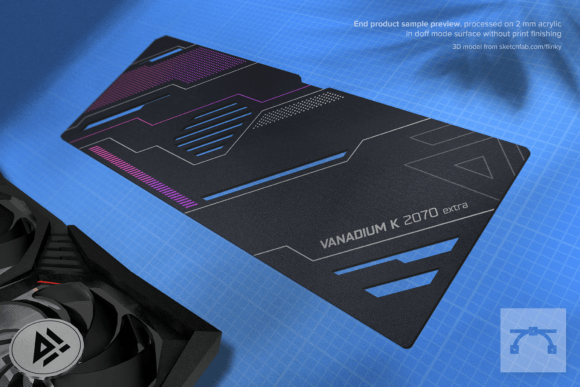
If you are new to this kind of project, starting with acrylic in a doff (matte) surface finish is a safe bet. It hides minor scratches, takes UV ink well, and gives the finished piece a professional, non-reflective appearance. The listing images show mockup previews of end-product samples processed on exactly this type of material, giving you a realistic sense of what the final result can look like.
Who Benefits Most from the Vanadium K 2070 Extra – Laser Cut?
This product is not aimed at every PC builder — it is designed for people who want to invest time and creativity into their build. Here is a closer look at the audiences who will get the most value from it:
Enthusiast PC Builders and Modders
If you already spend hours choosing cable sleeves, custom loop fittings, and case lighting, the backplate is a natural extension of that effort. The Vanadium K 2070 Extra – Laser Cut lets you carry a consistent design language across your entire system. You can match the backplate to your case theme, your desk setup, or even a specific game or artwork you love. Because the template is editable, you can iterate — try different cuts, adjust the color palette, and test variations before committing to production.
Small-Scale Fabrication and Design Studios
For businesses that offer custom PC accessories or laser-cutting services, this template is a ready-to-use product line. You can purchase the template, customize it for clients, and produce backplates on demand. The inclusion of multiple vector formats (Ai, SVG, EPS, PDF) ensures compatibility with most design and production software, reducing setup time. The two pre-made artworks can serve as starting points or inspiration for client consultations, helping people visualize what is possible even if they do not have design experience.
Content Creators and Streamers
Your PC is part of your brand. A custom backplate with your logo, channel name, or signature color scheme makes your setup instantly recognizable on camera. The Vanadium K 2070 Extra – Laser Cut allows you to brand your hardware without resorting to stickers or decals that can peel or look unprofessional. A laser-cut, UV-printed backplate is a permanent, high-quality addition that holds up to the heat and handling of a working system.
Real-World Scenarios and Applications
To understand the practical value of this template, consider a few concrete scenarios:
- Scenario 1 — The Themed Build: You are putting together a cyberpunk-inspired PC with neon accents and dark matte components. Using the template, you design a backplate with geometric circuit traces, cut out with the laser to allow airflow, and printed in translucent cyan on black acrylic. The backplate glows when the case lighting hits it, completing the look without any off-the-shelf part matching the vision.
- Scenario 2 — The Minimalist Workstation: A professional video editor wants a clean, quiet workstation. They design a backplate with a subtle matte aluminium finish and a small engraved logo. No extra colors, no RGB — just a precise, understated piece that looks like it came with the card from the factory. The template makes it easy to align the logo perfectly with the existing PCB layout.
- Scenario 3 — Small Business Production: A local laser-cutting shop receives a request for custom GPU backplates. They purchase the template, offer three base designs, and let clients choose colors and add text. Because the template includes all vector formats, the shop can import it directly into their laser software and start cutting within minutes. The UV printer adds the artwork in a separate pass. The whole process is streamlined enough to offer as a standard service with a short turnaround.
Strengths, Considerations, and Practical Limitations
No product is perfect for every situation, and the Vanadium K 2070 Extra – Laser Cut is no exception. Understanding its strengths and limitations will help you decide if it is the right tool for your project.
Strengths
- Precision fit: The dimensions and mounting points are matched to specific GPU models, reducing the risk of misalignment or poor fit.
- Full creative control: You can edit every element — colors, shapes, typography, and cut paths — because the files are fully vector-based and editable in Illustrator.
- Professional output quality: When processed correctly with a laser cutter and UV printer, the result looks and feels like a premium manufactured part.
- Multiple format support: Ai, SVG, EPS, and PDF ensure compatibility across different software and production workflows.
Considerations and Limitations
- Requires access to fabrication equipment: This is not a ready-to-install product. You need a laser cutter and UV flatbed printer (or access to a service that has them).
- Learning curve for design software: While the template is editable, you need at least basic proficiency in Adobe Illustrator or a compatible vector editor to make meaningful changes.
- Material choices matter: 2 mm acrylic and aluminium are recommended, but aluminium is harder to cut and may require a higher-power laser. Choosing the wrong material can lead to poor results or damage to the equipment.
- Thermal considerations: The backplate attaches to the PCB with double tape or thermal pads. While this is standard practice, it is worth ensuring that your design does not block essential airflow or interfere with the card's cooling solution. The template includes cutouts for ventilation, but you should verify they align with your specific card's layout.
- No printed finishing on the sample mockup: The listing images show a mockup on doff acrylic without print finishing. Your final output will depend on the quality of your UV printer and the settings you use. Test prints are highly recommended before committing to the final piece.
How to Evaluate Suitability for Your Project
Before purchasing the Vanadium K 2070 Extra – Laser Cut, take a moment to assess your situation against a few key criteria:
- Card compatibility: Confirm that your GPU matches one of the listed models (08G-P4-3070-KR, 08G-P4-3070-KR Black, 08G-P4-3071-KR KO Gaming, or 08G-P4-2072-KR). The template is not universal, so using it with a different card may result in poor fit or blocked ports.
- Fabrication access: Do you own or have convenient access to a laser cutter and UV flatbed printer? If not, check local makerspaces, fabrication studios, or online custom manufacturing services. Many will accept the provided file formats directly.
- Design confidence: Are you comfortable editing vector files? If the answer is no, consider collaborating with a friend or hiring a freelance designer for a one-time customization. Alternatively, the two pre-made artworks can be used as-is for a quick, clean result.
- Budget for materials and production: The cost of the template is only the beginning. Factor in the price of acrylic or aluminium sheet, laser cutting time, UV printing, and any fastening materials. Comparing this against pre-built custom backplates will help you decide whether the DIY route offers the value you are looking for.
- Time investment: Designing, testing, and producing a custom backplate takes time — especially if you iterate on the design. Make sure you have the bandwidth to see the project through. The result can be deeply satisfying, but it is not a quick upgrade.
Final Thoughts on the Vanadium K 2070 Extra – Laser Cut
There is a growing appreciation among PC builders for hardware that feels personal. The Vanadium K 2070 Extra – Laser Cut template addresses that desire in a practical, professional way. It removes the most tedious parts of custom backplate creation — measuring, aligning, and formatting — while leaving the creative decisions entirely in your hands. Whether you are producing one piece for your own rig or building a small product line for customers, the combination of precise dimensions, editable vector files, and compatibility with standard fabrication equipment makes this a versatile foundation.
That said, this product is not for everyone. If you want a ready-to-install backplate with no additional work, a pre-manufactured option may be more appropriate. But if you enjoy the process of designing, making, and refining — and you have access to the right tools — the Vanadium K 2070 Extra – Laser Cut offers a level of creative control that few aftermarket parts can match. It transforms the backplate from a passive cover into an active expression of your style, your brand, or your vision. And in a world where so many PC components look the same, that kind of differentiation is genuinely valuable.
For those ready to take the next step, the template serves as both a practical tool and an invitation. The file is waiting. The laser and printer are ready. The only question left is what you will make of it.