50 Retro Gaming Joystick Vector Bundle
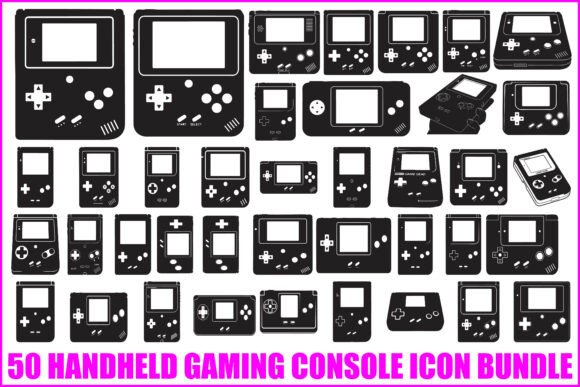
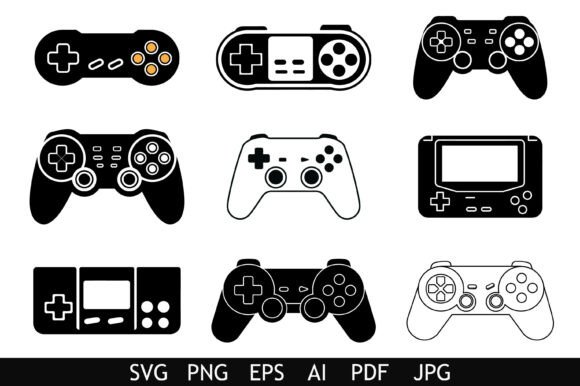
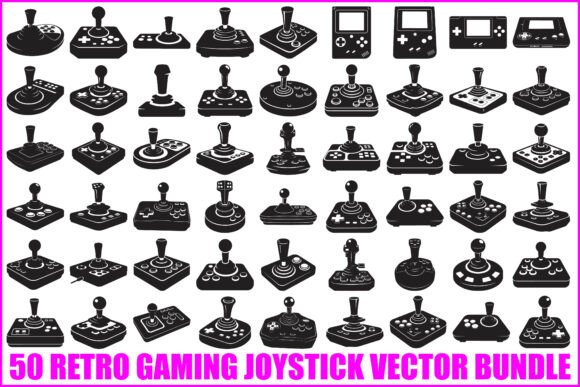
If you have ever worked on a project that needed a classic arcade look, you quickly realize how hard it is to find clean, ready-to-use assets that actually capture the feel of old-school gaming. The 50 Retro Gaming Joystick Vector Bundle solves that problem directly. It is a curated set of fifty distinct joystick and controller designs, all presented in a bold black silhouette style. Each vector has been built with clean shapes and smooth edges, so you are not fighting messy lines or awkward curves when you scale them up for a poster or shrink them down for a sticker.
For anyone who grew up dropping quarters into arcade cabinets or spending afternoons in front of a console, these designs carry an immediate sense of nostalgia. But nostalgia alone is not enough to make a design asset useful. What makes this bundle valuable is how practical it is for real projects. Whether you are a freelancer putting together a logo for a gaming channel, a small business owner creating merchandise for a retro-themed event, or a hobbyist making custom t-shirts for friends, having fifty unique shapes to work with means you are never stuck with just one option.
What makes this bundle different from a random set of vectors
There are plenty of vector collections online, but many of them feel thrown together. Shapes are inconsistent, edges are jagged, and the files are formatted in ways that make editing a headache. This bundle avoids those problems by offering each design in five different formats: EPS, SVG, PNG, JPG, AI, and PDF. That might sound like overkill, but in practice, it saves you time. If you use Adobe Illustrator, the AI files open directly without any conversion issues. If you work in CorelDRAW, the EPS files are ready to go. And if you prefer a drag-and-drop approach with Cricut or Silhouette, the SVG files give you a seamless experience.
The PNG files come with transparent backgrounds, which is a small detail that makes a big difference when you are layering designs on top of colored surfaces or photos. The high-resolution JPG files are useful for quick mockups or presentations where you do not need to edit the vector itself. Having all these formats in one download means you do not have to hunt down converters or worry about whether your software can handle the file type.
The black silhouette style works for almost any project
One of the smartest design choices in this bundle is the consistent use of bold black silhouettes. When a design is stripped down to a solid shape, it becomes incredibly versatile. You can change the color in seconds, apply gradients, add textures, or invert the design for negative space effects. The silhouette approach also makes the vectors ideal for screen printing, where clean lines and solid fills are easier to work with than complicated gradients or thin strokes.
For print-on-demand creators, this is a huge advantage. A well-shaped silhouette holds up on t-shirts, hoodies, tote bags, and mugs without losing detail. The same design that looks sharp on a poster will also look clean on a small sticker or a keychain. Because the edges are smooth, you do not get that pixelated or jagged look when scaling down, which is a common complaint with lower-quality vectors.
Practical ways to use the bundle in your work
Let me walk through a few realistic scenarios where this bundle fits naturally into a creative workflow. Say you are designing a logo for a local arcade bar. You want something that feels authentic but does not look like a cheap clip art paste. With fifty different joystick shapes, you can pick one that matches the vibe of the venue, then tweak the proportions, rotate it, or combine it with text. Because the files are fully editable, you can adjust the thickness of the handle or the shape of the base without starting from scratch.
Another common use case is event branding. If you are organizing a retro gaming tournament or a LAN party, these vectors can become the visual anchor for your flyers, social media graphics, and welcome signs. Consistent use of the same joystick shape across different materials creates a cohesive look without requiring a professional graphic designer on staff. Teachers and educators have also found these useful for creating classroom materials that engage students who love video games. A simple joystick silhouette on a worksheet or a reward sticker can make a mundane task feel more exciting.
For bloggers and content creators who write about gaming culture, having a set of high-quality vectors means you no longer have to scour free image sites for something decent. You can use the PNG files directly in blog posts, YouTube thumbnails, or social media cards. The transparent backgrounds make it easy to place the joystick over existing images without awkward white boxes around the edges.
What to consider before you start using the files
One thing to keep in mind is that these are silhouette designs, not full-color illustrations with shading and gradients. If your project requires highly detailed realistic joysticks with shadows, reflections, and multiple colors, this bundle may not match that specific need. But if you are looking for clean, bold, scalable shapes that you can customize and reuse across many projects, the silhouette style is actually a strength rather than a limitation.
Another practical consideration is software compatibility. While the bundle includes formats that work with most programs, it is always a good idea to check which version of your software you are running. For example, older versions of CorelDRAW or Illustrator might handle EPS files differently. The SVG files are generally the safest bet for modern web-based tools like Canva or Figma, and they also import cleanly into Cricut Design Space and Silhouette Studio.
If you are new to working with vector files, you might find the sheer number of formats a bit overwhelming at first. A simple approach is to start with the SVG files for most projects. They are widely supported, easy to edit in free software like Inkscape, and maintain their quality at any size. As you grow more comfortable, you can explore the AI and EPS files for more advanced editing options inside professional design programs.
Why bundles like this matter for small businesses and creators
Time is often the most limited resource for freelancers, small business owners, and solo creators. Spending hours drawing a single joystick from scratch is rarely the best use of that time, especially when you need a whole set of consistent designs. Having fifty ready-made vectors at your fingertips cuts down the prep work significantly. You can spend your energy on layout, color choices, and messaging instead of technical drawing.
Commercial use is clearly allowed with this bundle, which removes a lot of legal uncertainty for people selling products online. If you run a print-on-demand store or make custom merchandise for clients, you do not want to worry about licensing restrictions or attribution requirements. The bundle is designed for both personal and commercial projects, so you can use the vectors on products you sell without paying royalties or crediting the designer. Always double-check the specific license terms included with your download, but the general intent is to give you freedom to create and sell.
Another benefit worth mentioning is consistency. When you pick vectors from different sources, the styles rarely match. One joystick might be detailed and realistic while another looks flat and cartoonish. Because all fifty designs in this bundle share the same silhouette style and clean edge approach, they work together naturally. You can mix and match them within a single project without visual conflict. This is especially useful for creating pattern designs, collage-style posters, or multi-element logos.
Getting the most out of the included formats
Let me offer a quick breakdown of how each format might fit into your workflow. The EPS files are great for professional print work where vector fidelity is critical. The SVG files are ideal for web designers and crafters using cutting machines. The PNG files with transparent backgrounds work well for quick mockups, email signatures, or any situation where you need a ready-to-use image without editing. The high-resolution JPG files are perfect for presentations or previews that need to look sharp but do not require further manipulation. The AI files give you native Adobe Illustrator access with fully editable paths, layers, and shapes. The PDF files serve as a universal format that can be viewed and printed reliably on almost any system.
Having all six formats in one bundle means you are prepared for whatever software or workflow a client or project demands. If a client asks for an editable AI file, you have it. If a print shop requests EPS, you have that too. This flexibility removes a lot of back-and-forth communication and lets you focus on the creative side of the work.
Final thoughts on adding retro vectors to your toolkit
The 50 Retro Gaming Joystick Vector Bundle fills a specific niche that often gets overlooked in larger asset marketplaces. It is not trying to be everything to everyone. Instead, it focuses on delivering a cohesive set of nostalgic gaming shapes that are genuinely useful across a wide range of personal and commercial applications. Whether you are branding a gaming event, designing merchandise, building a website, or just adding some retro flair to a classroom handout, these vectors give you a solid foundation to build on.
If you value clean shapes, multiple format options, and the freedom to use your assets commercially, this bundle is worth a close look. The silhouette style may be simple, but simplicity often gives you the most creative room to adapt and personalize. And with fifty unique designs in the set, you will likely find more than a few that feel like they were made for your specific project.