How the Gaming Dad SVG Bundle Helps You Create Better Gifts Without the Guesswork
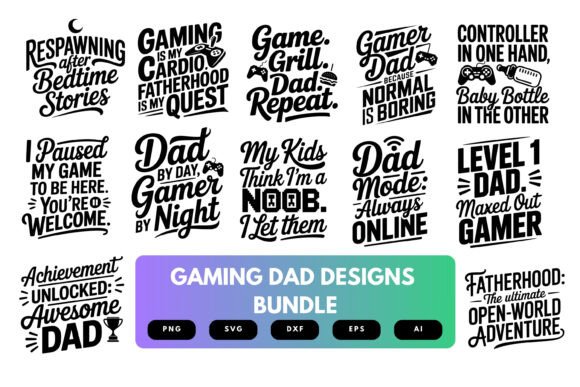
If you have ever tried to make a custom gift for a dad who also loves video games, you already know the challenge. You need a design that feels personal, looks sharp, and actually works with your cutting machine or printer. You also want something that captures the reality of being a father who still sneaks in gaming sessions after bedtime. The Gaming Dad SVG Bundle is built for exactly that scenario. With twelve designs that combine controller graphics, pixel-style fonts, funny gaming quotes, and silhouettes, this bundle gives you ready-to-use files for T-shirts, mugs, decals, wall art, and more. But like any digital product, getting the best results depends on understanding what you are working with and avoiding a few common missteps.
Why Many People Miss the Full Potential of SVG Bundles
A lot of creators download an SVG bundle, open the files, and jump straight into cutting or printing without checking the details. That approach often leads to frustration. You might end up with a design that does not fit your project surface, a file that does not work with your software, or a print that looks blurry. The mistake is not in the bundle itself but in how you approach the entire process. When you take a few extra minutes to understand what each file contains and how it behaves, you save time, materials, and money.
The Gaming Dad SVG Bundle includes files in SVG, EPS, PNG with transparent background, AI, and DXF formats. That variety is not just a list of acronyms. It is the difference between a project that works on the first try and one that requires extra troubleshooting. If you only open the SVG file in a web browser and try to use it directly, you will likely miss the layers, the transparency, or the proper scaling. The PNG files are great for sublimation and quick mockups, while the SVG and DXF files are ideal for cutting machines like Cricut and Silhouette. Knowing which file to use for which task is the first step toward consistent results.
Overlooking Resolution and Print-Ready Details
One of the most overlooked details in digital design bundles is resolution. You might see a design you love and assume it will print clearly at any size. That assumption can lead to disappointing wall art or blurry T-shirt transfers. The Gaming Dad SVG Bundle specifies 300 DPI for its files. That is the standard for professional-quality print projects. When you work with 300 DPI files, you can scale the designs within reason without losing sharpness.
But there is a nuance here. The SVG and EPS files are vector formats, which means they are resolution-independent. You can scale them up or down without any loss of quality. The PNG files are raster, so they have a fixed resolution. If you plan to print a large poster, you want the vector version. If you are doing a small decal or a mug, the PNG at 300 DPI will work perfectly. The mistake many people make is using the wrong file type for their output size. Check your project dimensions first, then choose the file format that matches. For a full-size gaming dad T-shirt, the SVG or EPS is usually the safer choice because you can resize it to fit any shirt size without worrying about pixelation.
Ignoring the Balance Between Fun and Readability
The designs in this bundle lean heavily into gaming culture with pixel-style fonts, controller silhouettes, and phrases that resonate with gamers. That is exactly what makes them appealing. But when you are putting a design on a physical item, readability matters. Some pixel fonts are difficult to read from a distance or when scaled down. If you place a design with a lot of text on a small decal or a coffee mug, the words might become illegible.
A better approach is to consider the final size of your project before you commit to a design. For larger items like a hoodie or a poster, the full quote and pixel font work great. For smaller items like a controller decal or a keychain, look at the silhouette-only designs or the ones with shorter text. The Gaming Dad SVG Bundle includes a mix of typography-heavy designs and simpler silhouette graphics. Use the simpler ones for small surfaces and the detailed ones for larger surfaces. That simple check can make the difference between a gift that looks clever and one that looks cluttered.
Misunderstanding Compatibility and Software Requirements
Another common source of frustration is assuming that all SVG files work exactly the same in every program. They do not. Some programs handle SVG layers differently. Some ignore transparency. Some do not recognize certain color profiles. The Gaming Dad SVG Bundle is designed to be compatible with Cricut Design Space, Silhouette Studio, Adobe Illustrator, Inkscape, and most other major design tools. But that compatibility depends on how you import the files.
If you use Cricut Design Space, you should upload the SVG file directly. Do not convert it to a PNG first, because you will lose the cut lines and layers. If you use Silhouette Studio, the DXF file is often a better option because it preserves the paths more reliably. The PNG files with transparent backgrounds are great for mockups and sublimation, but they are not ideal for cutting because they do not contain vector paths. Knowing these small differences ahead of time prevents wasted material and project restarts.
One practical step: before you start your final project, do a quick test cut or test print on plain paper. That allows you to see if the file imports correctly, if the layers are aligned, and if the size is appropriate. It takes five minutes and can save you from ruining a blank T-shirt or a mug.
Forgetting to Check for Print Cut Readiness
If you are creating stickers or decals, you need designs that are ready for print and cut workflows. That usually means having a transparent background around the design so your machine can cut around it precisely. The PNG files in this bundle come with transparent backgrounds, which makes them suitable for print-cut projects. But you still need to ensure that your software is set up correctly. Some people import the file and forget to set the cut line, so the machine prints the entire rectangle instead of cutting around the controller shape.
The SVG files are typically better for cut-only projects where you are using vinyl. The EPS files work well for professional print shops that need high-resolution vector output. If you plan to sell finished products, check the commercial use terms of the bundle. Many SVG bundles allow personal use only, while others include small business commercial rights. Knowing that upfront prevents legal headaches later. The Gaming Dad SVG Bundle is marketed for DIY gifts and personal merch, but always double-check the license that comes with your download to confirm what is allowed.
Buying Without a Clear Project Plan
It is easy to browse a bundle of twelve fun designs, see several that you like, and make the purchase without a clear idea of what you will actually make. That is not necessarily a problem, but it can lead to unused files and wasted money. The most effective buyers have at least one project in mind before they buy. Maybe you want a Father's Day T-shirt with the phrase that matches your dad's gaming style. Maybe you want matching decals for his console and his water bottle. Maybe you want a set of wall art prints for his gaming room.
When you know your project, you can choose the design that fits the surface, the file format that works with your method, and the size that matches your blank. That approach also helps you avoid buying multiple bundles that overlap in style or content. The Gaming Dad SVG Bundle covers a broad range of gaming dad themes, so it is likely that one bundle will give you enough variety for several projects. Look at each design in the preview and think about which one would work for a shirt, which one would work for a decal, and which one would work for a mug. That simple mental exercise helps you get the most value from the purchase.
Relying Entirely on Default Sizing
Another oversight that affects the final look is accepting default sizes without adjusting them for your surface. If you import a design and cut it at its default size, it might be too large for a baby onesie or too small for a poster. The SVG files in this bundle are scalable, so you can resize them freely. But resizing needs to be proportional. If you stretch the width without locking the aspect ratio, the design will look distorted.
For T-shirts, a common mistake is making the design too small. A design that looks right on your computer screen can appear tiny on an adult-sized shirt. A good rule of thumb is to measure the actual surface area where the design will go. For the chest of an adult T-shirt, a design around 10 to 12 inches wide is usually appropriate. For a mug, around 8 inches wide wrapped around the surface is common. For a decal on a laptop, 3 to 4 inches might be ideal. Test the size with a paper cutout before you commit to the final material.
Neglecting the Power of Mockups Before Production
One of the most helpful steps that many people skip is creating a digital mockup before they cut or print. You can take the PNG files from the Gaming Dad SVG Bundle and place them onto a photo of a blank T-shirt or mug using free software like Canva, GIMP, or even a simple photo editor. A mockup shows you how the design will actually look on the item. You can see if the colors work, if the size is right, and if the placement makes sense.
This step is especially important if you are making gifts for someone else. A mockup lets you adjust before you use the real materials. If the design looks awkward on the mockup, you can choose a different design from the bundle or change the placement. It is much better to catch that in a digital file than after you have pressed a heat transfer onto a shirt.
Making the Most of the Bundle Over Time
The Gaming Dad SVG Bundle is a digital download, which means you have the files on your device and can use them repeatedly. One mistake is using a design once and forgetting about it. Revisit the bundle when you need a new gift idea or when you want to create matching merchandise for an event. The twelve designs give you enough variety to make different items for different dads without repeating the same look.
Another long-term benefit is that vector files can be recolored easily. If the design comes in one color and you want it in another, you can change the fill in your design software. That allows you to match team colors, holiday themes, or personal preferences. The flexibility of the format extends the value of the bundle well beyond the initial download.
A Better Way to Approach Digital SVG Bundles
The strongest approach is to treat the Gaming Dad SVG Bundle as a toolkit rather than a one-time purchase. Look at the designs, pick one that fits your project, choose the right file format for your machine, check the size and resolution, do a test run, and only then produce the final item. That process eliminates most of the common mistakes that lead to wasted materials and disappointing results.
The bundle itself is thoughtfully put together, with designs that genuinely reflect the mix of fatherhood and gaming culture. But even the best files need someone who knows how to use them well. By understanding the practical details, you ensure that your final product looks professional, fits correctly, and brings the reaction you are hoping for. Whether you are making a T-shirt for your own dad, a decal for your controller, or merchandise for a small business, those few extra minutes of preparation make the difference between a gift that is just okay and one that truly scores.